Hardware Room Vendors 2026

This year we will have free hands on activities in the Hardware Room! This new feature was designed to enhance both engagement and learning for attendees. By incorporating an additional educational component, the conference aims to attract new participants while offering valuable insights into emerging technologies and industry trends. The initiative reflects a strong commitment to education, collaboration, and the continued growth of the LabVIEW community.
Why Visit the Hardware Room?
Across assorted demos, attendees will see:
How LabVIEW serves as the central environment for TwinCAT, EtherCAT, PXI, and DAQ systems
Real, working LabVIEW projects interacting with hardware
Practical examples that mirror real-world development and test challenges
Clean, approachable setups designed for learning and discussion
How does it work?
Our Hardware Vendors have created 30 minute long hands-on activities for attendees to participate in. Each vendor will have 6 demo stations available per time slot. Demos will be available throughout the entirety of the event, not just during breaks. We encourage attendees to sign up for their demo slot ahead of the conference. This ensures that you get your preferred time and don’t miss out on any presentation content that you wish to see. If you don’t sign up for a slot ahead of time, do not fret. We will be able to offer any unused demo slots during the event. *Please note- you must purchase a ticket to the conference in order to participate in Hardware Demos.
Beckhoff Automation USA
Activity Description:
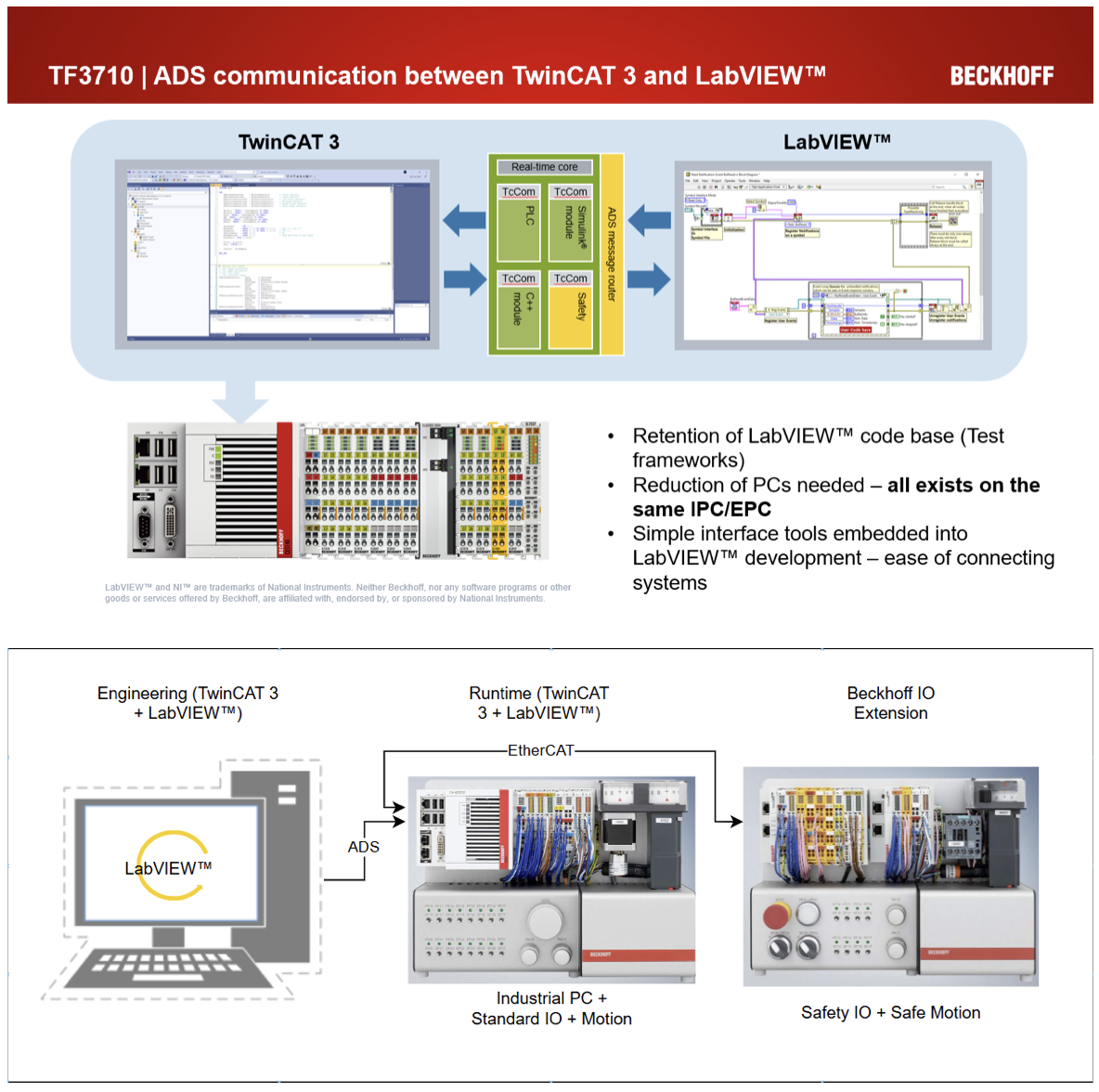
This demo is an introduction on how to couple LabVIEW™ and DAQ system(s) to an expanded tool kit including but limited to motion, safety, connectivity, intrinsically safe hardware and much more. In 30 minutes explore how to leverage Beckhoff technology with an existing LabVIEW™ codebase and simplify test designs, significantly reduce costs, and cultivate innovation to solve tomorrow’s test production test and quality challenges.
1. Start with a clean slate project on the Beckhoff engineering environment TwinCAT 3 and a fresh LabVIEW™ project to a complete system interfacing and exchanging data.
2. Configure Beckhoff hardware via LabVIEW™ during runtime for system flexibility.
3. Deploy a Estop safe motion project with TwinSAFE & LabVIEW™ and visualize machine state, motion feedback, and additional diagnostics to keep test systems easy to troubleshoot and minimize downtime.
4. Bonus – explore other functionalities of the TwinCAT 3 to LabVIEW™ ADS
Interface such as:
a. Remote procedure calls from LabVIEW™ to TwinCAT – provide parameters and call program methods for quick control without establishing a full communication pipeline.
b. Automation Interface VI calls to perform all actions in Step 1 (see above) without leaving LabVIEW™.
c. Express Vis for quick DAQ and control.
Hardware/Software:
- Engineering PC with TwinCAT + LabVIEW™ Development
-Hardware Stand (BIM) + Safety Stand:
-IPC (Controller with Windows (Linux /w hypervisor, or TC BSD OS options available)
-Various IO - digital IO, analog IO, Safety, encoder feedback, compact motion,(intrinsic safety, communication, and various other types not on stand)
-Motors and drives (Stepper and Servo)
-EtherCAT communication coupler
LabVIEW™ and NI™ are trademarks of National Instruments. Neither Beckhoff, nor any software programs or other goods or services offered by Beckhoff, are affiliated with, endorsed by, or sponsored by National Instruments.
Emerson/National Instruments
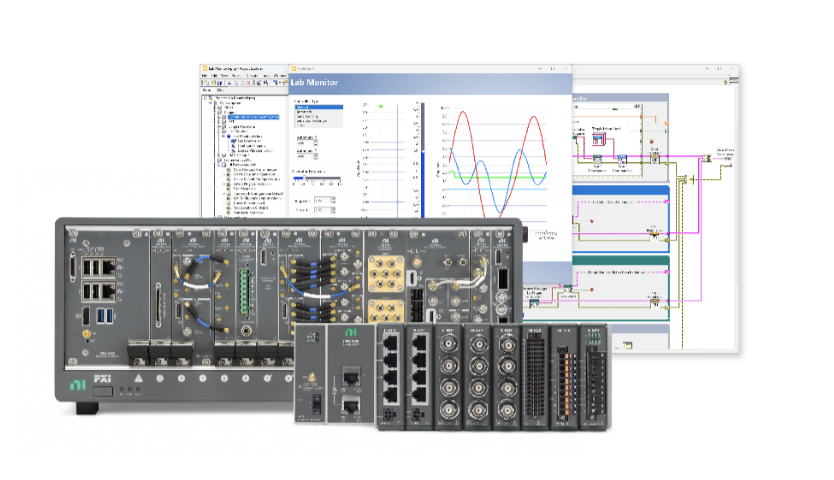
NI’s offering features six live demos—four PXI systems and two CompactDAQ (cDAQ) systems—all set up to highlight practical LabVIEW workflows used by engineers every day.
Descriptions:
PXI + LabVIEW Demos:
The PXI demos focus on higher- performance use cases where timing, synchronization, and modularity matter. Attendees can see how LabVIEW is used to configure, control, and scale PXI systems for applications such as mixed-signal measurement, automated validation, and advanced test systems. The emphasis is on how developers structure LabVIEW projects to interact with modular PXI hardware and not just the hardware itself.
CompactDAQ + LabVIEW Demos:
The CompactDAQ demos highlight fast setup and straightforward data acquisition using LabVIEW. These demos focus on common developer scenarios such as sensor measurements, electrical signals, and bench-top data collection. Attendees can see how LabVIEW simplifies configuration and measurement while still supporting scalable, modular hardware.